Optimization
What a sweep runs, its limits and test-year cost, the settings it shares, costs, using a result, and walk-forward on unseen data.
A sweep runs your strategy once for every combination of the values you choose, over one period, and lists the results. This page states exactly what runs, what it costs, what each number means — and what the product does not do.
Video tutorial · E1 · on YouTubeSet up a sweepWhat a sweep is
- A sweep is a full grid search: every combination of the values you set is run once. There is no genetic, random or adaptive search.
- Each combination is one backtest of your strategy with those values substituted, on the same engine entry point and the same market data as a backtest you start yourself.
- The number of combinations is the product of the number of values on each swept parameter, so every parameter you add multiplies the run count.
What you can sweep
Any value field of a provider. A number field is swept as a range (start, end, step); a dropdown or on/off field is swept as the list of options you pick. Every such field is offered — there is no separate "mark as optimizable" step.
The timeframe of any provider that reads a timeframe, and the symbol a provider reads.
The symbol an action trades.
The bar shift of one read: either side of a condition, or any of the 9 values an action's trade levels read (volume, take profit, stop loss, trailing-stop activation, trailing-stop step, break-even activation, order price, order expiration, close volume). A shift is a whole number of bars from 0 to 1,000: 0 is the current value, k the k-th closed bar back. A shift is offered only where the provider being read accepts one.
A shared parameter (a constant several providers or actions reference): you sweep the constant's own value and every place that references it moves together. The referencing places are not offered as separate axes, and a request for one is refused with a message saying to sweep the constant.
Not sweepable: references to other providers or actions, expression trees, text and date fields, buffer (line) numbers, and fields whose value comes from a shared parameter.
Two rules protect expressions read at a bar offset: a shift on an Expression is offered only when the expression sits on one bar series, and a timeframe sweep that would put an expression's inputs on two different series is refused when you start, naming the expression.
Symbols: every instrument whose contract specification is confirmed; a provisional one is refused. Timeframes: M1, M2, M3, M4, M5, M6, M10, M12, M15, M20, M30, H1, H2, H3, H4, H6, H8, H12, D1, W1, and MN1.
Ranges, values and run numbers
How many values a range gives:
floor((end − start) ÷ step + 0.000000001) + 1— start, start + step, … up to the largest value not above end. The end is included when it falls on a step: 0 → 1 by 0.1 is 11 values. Step must be above 0 and end at least start; start = end pins the parameter at one value and adds no runs. The dialog and the server use the same formula.Values are rounded to the range's decimals. The i-th value is
start + i × step, rounded to the larger number of decimals of the start and the step: 0 → 1 by 0.1 gives exactly 0.1, 0.2, 0.3 …, and 0.15 by 0.1 gives 0.15, 0.25 …. The stored value is the one on the grid, so a filter "= 0.7" finds its row and adopting it writes 0.7.Every value must fit the setting — checked when you start. Periods, bar counts, hours, minutes, shifts and similar settings are whole numbers: a fractional start or step on one is refused. A range whose first value is below the setting's minimum, or whose last value on the grid is above its maximum (for example a period above 2,500 or below 1), is refused too — the last value on the grid, not the end you typed, so 2,400 → 2,550 by 100 is accepted. When you sweep a shared parameter, its values must fit every setting that reads it. A refused sweep costs nothing and creates nothing.
An indicator the sweep moves is also checked at the sweep's corners, not only value by value (indicators in a sweep).
A list needs at least one value, values must be distinct, and a parameter can be swept on only one axis.
Run numbers count the grid from 0 with the first parameter in the dialog varying fastest:
run = i₁ + n₁ × (i₂ + n₂ × (i₃ + …)), where iₖ is the value's position on parameter k and nₖ that parameter's number of values. A run number names the same combination in the table, the chart, "Run full backtest" and your connected AI app.How the dialog starts a parameter: a number field starts at the value your strategy has today and runs 4 steps up, the step a tenth of the value's order of magnitude (at least 1 for a whole number): 14 → 14…18 by 1, 200 → 200…240 by 10, 2.5 → 2.5…2.9 by 0.1. With no current value it starts pinned at 0. A list field starts with every option selected, except a symbol field, which starts on the symbol your strategy uses today.
Indicators in a sweep
- When you create an optimization or a walk-forward, every indicator the sweep moves is built at the corners of the sweep: each swept number at its smallest and at its largest value on the grid, each option of a swept list, and each value of a swept timeframe. An indicator is moved by a swept field of its own, by a swept shared parameter one of its fields reads, by a swept timeframe (its own or the shared one it reads), or by a swept shift on a read of it.
- The sweep is refused when a corner needs more than 2,500 bars of history. That happens where periods add up: MACD's and OsMA's slow average plus the signal, the Stochastic Oscillator's three periods, ADX's twice its period, Ichimoku's longest window plus its Kijun-sen, and VWAP's anchor period counted in bars of a swept timeframe (a weekly VWAP on one-minute bars).
- It is also refused when a corner moves a line's smallest readable position past a read in your rules: sweeping Ichimoku's Kijun-sen while a rule reads the Chikou span at a fixed position, or sweeping that read's own shift below the line's smallest position (lines drawn back).
- The refusal comes before anything is charged or saved. It names the setting, the parameter, the value that breaks it
and the largest value that still works, for example:
paramRef '5.period': 'adx' at period = 1,300 needs 2,600 bars of history, more than the 2,500 bars one run may use; sweep period up to 1,200 at most.With several swept parameters it names the ones to narrow; with a swept timeframe, the values of its axis that work. - A sweep that moves no indicator field, no indicator's timeframe and no read's shift is not checked this way.
- VWAP's own rule against bars as long as its anchor or longer is checked when you save the strategy, not at a sweep's corners: a sweep of the timeframe up to that length is accepted, and those combinations read a VWAP equal to each bar's own price.
Limits
| Bar by bar (M1) | Tick by tick | |
|---|---|---|
| Combinations per sweep | 2,000 | 200 |
| History per sweep | no limit beyond the data available | 20 years (365.25-day years) |
The dialog shows the run count against the mode's cap and blocks Start above it; when a tick grid would fit in bar mode it says so. The server checks again.
The dialog limits From and To to the period in which every instrument the sweep may read has data — including every symbol you sweep — and locks Start when no such period exists. This check is made in the dialog only.
Every combination runs under its own limits: 1,800 seconds of run time, 2,000,000 closed trades and 50,000 open positions plus pending orders. A combination that hits one fails; one that is clearly on course to exceed the time limit is stopped early.
And it may use only the compute it was charged (What a sweep costs): 0.16 processor-minutes per test-year it was charged, never less than 30 seconds; a combination that reads a symbol its worker has not read yet in the sweep gets 1.6× that, because it also reads the market data the next ones reuse (in a sweep over the symbol, the first on each symbol). A combination that needs more — or is clearly on course to — is stopped, and the sweep ends: "Run {n} of this sweep was stopped: it needed more than the {t} of processor time its {y} charged test-years allow, so the sweep ended. The runs that ran stay charged; the runs not started were refunded to the pool. This strategy is too heavy for a sweep of this size: try a shorter range, bar mode, or fewer conditions checked on every tick." The results already in stay readable.
A strategy over the complexity cap — 500 units — cannot be swept; the refusal names the count, the cap and the heaviest parts (what weighs most: see Strategy semantics). A combination whose own values push it over the cap (for example a larger swept record-set capacity) fails on its own.
You can have at most five optimizations waiting or running at once, sweeps and walk-forwards together (a walk-forward counts once, whatever its folds). A sixth is refused: "You have 5 optimizations waiting or running, the most at once. Wait for one to finish, or cancel one, then start this one again." No add-on raises this limit.
What a sweep costs: test-years
Sweeps are paid from a monthly pool of test-years, separate from backtests. Each plan's pool, and the most one sweep may cost, are on Plans → optimization and test-years; without a plan no sweep starts.
Cost of a sweep = combinations × years × weight, where years = the days from From to To ÷ 365.25 and the weight is 5 in tick mode and 1 in bar mode for a strategy that checks nothing on every tick. Examples, in test-years: 200 combinations over 3 years in bar mode cost 200 × 3 × 1 = 600; 100 combinations over 2 years in tick mode cost 100 × 2 × 5 = 1,000.
Conditions checked on every tick weigh more, because they cost more to run: each one adds 0.9 to the tick-mode weight, and every 80 add 1 to the bar-mode weight (the units are the strategy's complexity count, the one the complexity cap reads; rules on candle close count nothing here). A swept value that changes that count — a record-set capacity, a price range's bars — is priced at the heaviest value in the grid. A strategy checking 9 conditions on every tick costs 5 + 9 × 0.9 per tick-mode year, about two and a half times a strategy checking none. The weights leave each combination about twice the compute it is measured to need, so a sweep is stopped only by a strategy far heavier than its charge. Connected AI apps show this cost before they start a sweep.
The full cost is checked against your plan's per-sweep limit and then taken from your pool when the sweep starts. If it does not fit in what is left this month — plus the credit of any test-year pack you bought (packs do not expire) — the sweep is refused and nothing is charged. The month is your billing month.
The dialog does not show the test-year cost before you press Start; it locks Start only when the pool is already empty. A refusal states the cost it computed.
Stopping refunds the combinations that had not started, pro rata (cost × not started ÷ total), into the month the sweep was charged to. Combinations already running finish and keep their charge. Deleting a sweep that is still pending or running refunds the same way, and so does a sweep that ends because a combination was too heavy. A failed or stopped combination is not refunded. Only a sweep whose market data could not be prepared — before any combination ran — is refunded in full.
A sweep does not use your daily backtest compute budget and does not count as a backtest. "Run full backtest" from a result does: it is an ordinary backtest.
Settings every combination shares
Fixed when the sweep starts and identical for every combination: From and To, initial balance, mode, leverage, account currency, slippage in points, and the virtual symbols attached.
From and To are whole UTC calendar days: From at 00:00:00 UTC, To at 23:59:59 UTC.
The account type is not a sweep setting: every combination runs on the account type of the pinned revision, the one the strategy declares. The report's Setup row names it, with the strategy's time zone.
One pinned revision. The sweep runs the revision you pick, or — if you leave it on the current version and that has unsaved changes — those changes saved as a new revision when you press Start (even if the sweep is then refused). Editing the strategy afterwards never changes a running or finished sweep; the report shows the revision it ran.
Each combination loads the warm-up history its own values need before From — the same history a backtest of those values loads.
The same limits as a backtest apply when you start: leverage up to 1:500, an initial balance up to 1,000,000,000 and a period up to the backtest's longest range for the mode. Above any of them the sweep is refused before anything is charged, so every combination can also be opened as a full backtest.
A sealed hold-out. When a hold-out is sealed on the strategy or on any of its copies, a sweep whose period reaches the seal date is refused before anything is charged, and the dialog stops the end date before it (The sealed hold-out).
Positions still open at the end of the test are closed there and pending orders are cancelled, exactly as in a backtest, so every result is fully realized. See The report's numbers.
Broker costs in a sweep
Without a virtual symbol, every combination trades the historical spread in the data (the recorded ask in tick mode, the minute's average spread in bar mode) with no commission, no swap and no spread markup; your slippage setting still applies. The sweep's Broker costs panel says the ranking is uncosted. See Costs and the account.
To rank with costs, attach one virtual symbol per instrument in the dialog — any instrument a combination may read, including symbols you sweep. They are checked and frozen when the sweep starts and applied to every combination; a combination that never touches an instrument ignores its virtual symbol.
What is stored for each combination
- 9 numbers and the parameter values. No equity curve and no trade list are kept per combination: open a combination as a full backtest to get its full report.
| Shown as | Exact rule |
|---|---|
| Net | Net profit in account currency = final balance − initial balance. Includes commission, swap (also swap charged straight to the balance) and the closing of positions still open at the end. |
| PF | Profit factor = gross profit ÷ |gross loss| over closed trades. 0 when there are no trades or no winning trades. With winning trades and no losing trade it reads "—" with "no losing trade" and counts as the best value: it sorts first, wins the best run marker and sits at the best end of a chart's scale. |
| Sharpe | The report's Sharpe ratio on daily equity (definition). With fewer than two daily returns, or returns that never vary, it is undefined: shown "—", sorted last whichever way you sort, matched by no filter and left out of the chart. |
| Max DD | The report's Max drawdown, as a percent of the peak it fell from (definition). |
| Trades | Closed trades: the rows of the trade list (a partial close is its own row; positions closed at the end count). |
| Payoff | Net ÷ Trades; 0 with no trades. |
| Recovery | Net ÷ the max drawdown in money; 0 when there was no drawdown. |
- Apart from that profit factor and an undefined Sharpe ratio, any value that is not a finite number is stored as 0. The definitions are the backtest report's — see The report's numbers.
- Shown with: Net signed, 2 decimals; PF 4 decimals; Sharpe, Max DD (with %), Payoff and Recovery 2 decimals; Trades whole.
Reading the report
Video tutorial · E2 · on YouTubeRead a sweep and pick robust settingsThe four tiles. Combos tested = combinations finished, including failed ones, out of the grid total. Profitable = combinations with Net above 0, out of the combinations that have a result — so the difference between the two counts is the number that failed. Median net = the middle Net (the upper of the two middle values when the count is even). Net spread = best Net − worst Net.
Parameter response. Line draws one parameter, Grid two, 3D two number parameters (a list parameter has no distance between its values, so it cannot be a 3D axis). It opens on 3D when the sweep has two or more number parameters, otherwise on Line, with the metric Net and the collapse Max. A point or cell holds every finished combination with those axis values; every other swept parameter is collapsed by Min, Max, Avg or Median, as you choose, and the cell says how many combinations it folds. An empty cell has no finished combination: not run yet, stopped before it was reached, or failed. The metrics on offer are the table's: Net, PF, Sharpe, Max DD, Trades, Payoff and Recovery.
The best run marker. The run with the best value of the charted metric is marked on the chart and in the results. Highest wins, except Max DD where lowest wins; a tie goes to the lower run number. It is the best on that metric over this one period — read Overfitting before trusting it.
Results table. Columns: #, each swept parameter, Net, PF and Max DD by default; Sharpe, Trades, Payoff and Recovery can be added. Sorted by Net, highest first; you can sort on several columns in order. Filters: = ≠ < ≤ > ≥ on numbers, = ≠ on list parameters, all filters combined with AND. The table fills in while the sweep runs.
No export. Sweep results cannot be exported (CSV or otherwise) today.
While it runs: the stage it is in (Preparing data with its bar and count, then Starting while the machines that run it launch), then the progress; an estimate of the time left — a rough one while the first combinations read the data, then measured from the later ones; results as they finish; the chart refreshed at most every 5 seconds.
When the last combination finishes you get an "Optimization completed" notification with the run count. See Risk alerts and notifications for notifications.
Overfitting and validation
A sweep alone scores every combination on the one period you chose. The top combination on any metric is the one that best fits this particular stretch of history, and the one most likely to be overfit. The report does not single it out beyond the marker: there is no "best settings" headline, and the tiles describe the whole grid.
Walk-forward is the check on data the sweep never saw: in the Configure dialog, switch What to run to Walk-forward. The period is cut into rolling folds; each fold sweeps your grid on its in-sample months, its winner runs once on the out-of-sample months that follow, which that sweep never saw, and the unseen stretches are stitched into one curve. See Walk-forward.
To test out of sample by hand: open a combination as a full backtest or adopt it, then backtest that revision over dates the sweep did not use — or run the sweep again on another period.
A connected AI app reads combinations ranked by their worst neighbour rather than their own score (below), which favours stable regions over isolated peaks.
The validation report puts the numbers side by side: how many variants the strategy and its copies have tried and how many independent tries they amount to, the Sharpe ratio deflated for them, the walk-forward, the Monte Carlo shuffle, a run's neighbours in its sweep, buy-and-hold, and a hold-out the platform keeps sealed until you test on it once. Every combination that completes counts as a variant (Validation).
Walk-forward
A walk-forward answers what one sweep cannot: do the values a sweep picks keep working on data it never saw?
- The folds. From the period's start, fold 1 takes the first in-sample months and the out-of-sample months after
them; each next fold starts one out-of-sample length later. The number of folds is
floor((whole months in the period − in-sample) ÷ out-of-sample); whatever lies after the last out-of-sample window is not used. Months are calendar months counted from the start date. A period must hold at least 2 folds: the dialog shows the folds as you type and locks Start walk-forward below that. - The lengths. In-sample from 3 to 60 months, out-of-sample from 1 to 24; the dialog starts on 12 and 3. An in-sample window ends just before its out-of-sample window starts, so the two never share a tick.
- Each fold sweeps the whole grid on its in-sample window, then picks a winner by the Selection metric you choose — net profit (the default), profit factor, Sharpe ratio, max drawdown (lowest wins), expected payoff or recovery factor. The winner is the best run whose neighbours also score well; when every run is a lonely spike, the best one is taken. The winner then runs once, as an ordinary backtest with the same settings and virtual symbols, on the fold's out-of-sample window. It goes through your backtest queue like any backtest, one at a time, so it waits while another of your backtests runs; when the day's time is spent, until it renews at 00:00 UTC. It waits at most 72 hours, then the fold fails: "The out-of-sample run could not start within 72 hours: the plan's backtests or its daily backtest time stayed in use." An out-of-sample run stopped at its share of the day's time is run again on the next day, three runs in all; the third time the fold fails with the run's message. Any other refusal (no plan, for one) fails the fold at once.
- A sealed hold-out must lie after the whole walk-forward, the last out-of-sample window included: a walk-forward reaching the seal date is refused before anything is charged (The sealed hold-out).
- Every fold is judged against the sweep's limits: its grid against the combinations per sweep and, in tick mode, the history per sweep (Limits), and its cost against the most your plan lets one sweep cost; the dialog's meter reads the runs per fold against the cap.
- Test-years. The whole cost is taken from your pool when the walk-forward starts: every fold's grid, each priced as a sweep over its in-sample window (What a sweep costs). Stopping refunds every fold's combinations that had not started, and so does a fold's sweep ending because a combination was too heavy (the walk-forward then fails with that sentence); when the market data cannot be prepared (3 attempts), the whole charge is refunded.
The report
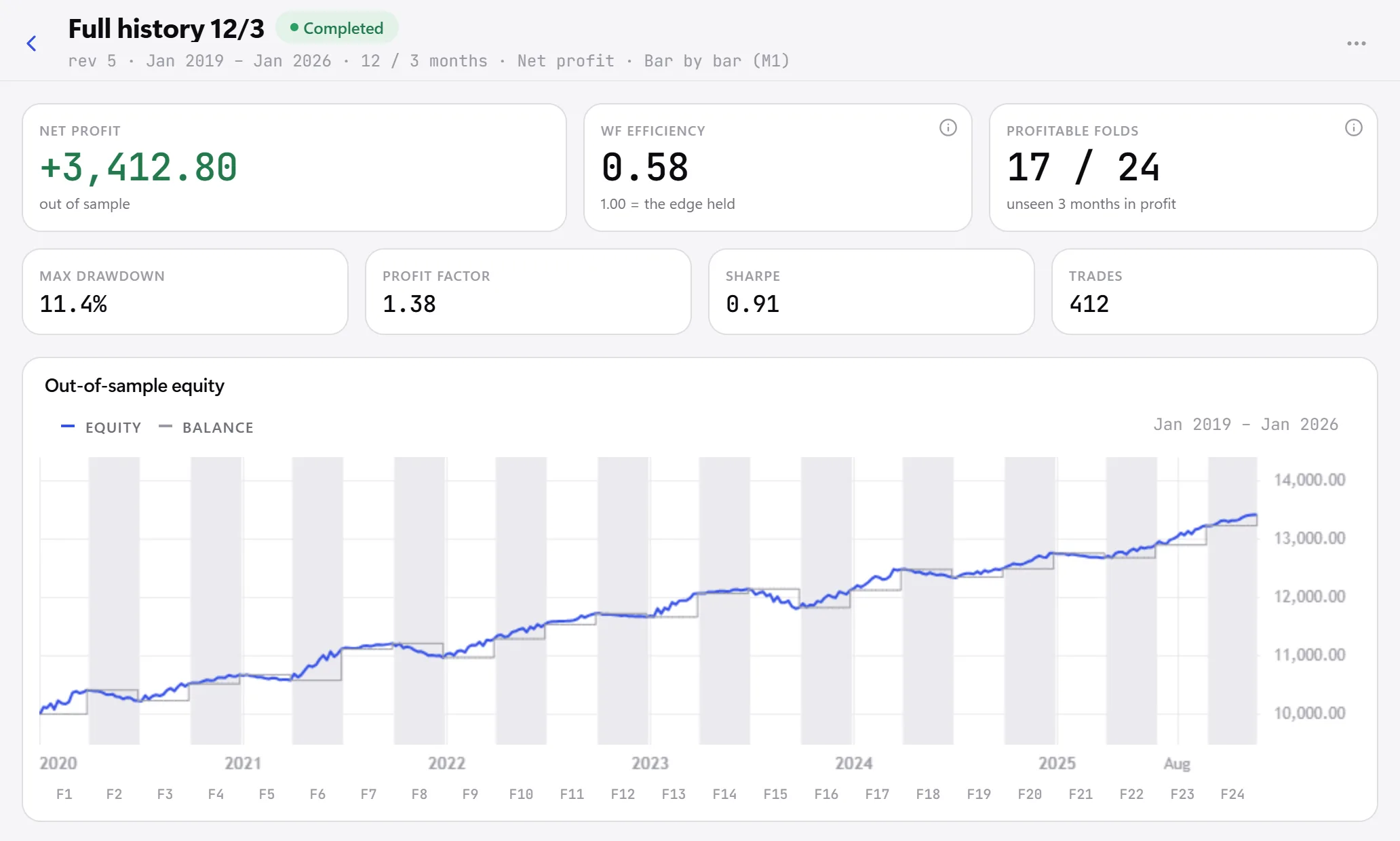
- The headline covers the folds completed so far, over their stitched out-of-sample curve: each fold's out-of-sample run continues where the one before it ended. Out-of-sample net profit, then WF efficiency, then Profitable folds, then max drawdown, profit factor, Sharpe ratio and trades over the folds' trades together.
- Walk-forward efficiency = the out-of-sample net profit per out-of-sample year ÷ the chosen runs' in-sample net profit per in-sample year, each summed over the folds. 1.00 means the edge held out of sample; near 0 means the values were fitted to the past; below 0, the unseen stretches lost money. It reads "—" when the in-sample side is not positive.
- Profitable folds counts the folds whose out-of-sample run made money, out of the folds with a result.
- Each fold shows its windows, its state, the values its sweep chose, its in-sample and out-of-sample net, and opens its sweep and its out-of-sample run. Prefer values that recur across folds over one fold's best figure.
- Adopt on a fold writes that fold's chosen values into your strategy, as Adopt parameters does for a sweep row: your current definition is saved as a revision first, and it asks before replacing changes made since the walk-forward.
- Rerun walk-forward (once the walk-forward has stopped) opens the dialog in walk-forward mode with the same name plus "(rerun)", revision, settings, parameters, virtual symbols, lengths and metric.
While it runs, and after
- Statuses: Pending while its market data is prepared (once, for the whole period, with the same count of bar series and months of ticks as a sweep), Running, then Completed when every fold has its out-of-sample result. A fold that fails fails the walk-forward: Failed with that fold's reason, the folds before it kept, the folds not started cancelled.
- Stop marks the folds not yet testing cancelled and refunds their unstarted combinations; a fold already testing its winner finishes and is kept. A stopped walk-forward cannot be resumed.
- The running jobs list shows a walk-forward as one Walk-forward job. When it ends you get a "Walk-forward completed" or a "Walk-forward failed" notification.
- Its fold sweeps and out-of-sample runs are not listed with your sweeps and backtests, and cannot be stopped or deleted on their own: Delete on the walk-forward removes them with it. Values you adopted stay on the strategy.
When a combination fails
A combination fails when it hits a limit, when the engine errors (including a value that cannot be built), when a virtual symbol it needs can no longer be priced, when the machine running it is interrupted repeatedly, or when it runs out of memory.
A failed combination leaves a hole: no row in the table, an empty cell in the chart, no part in the tiles except Combos tested. It keeps its test-year charge, and the reason is not shown anywhere in the product.
Statuses: Pending → Running → Completed when every combination has finished — even when every one failed ("Completed" with no results) — Cancelled when you stop it, or Failed when its market data cannot be prepared.
While it runs, a sweep goes through three stages. Preparing data: the market data its combinations need is gathered once, with a count of the bar series and the months of ticks done — a sweep over the same data as an earlier one reuses it at once. The first combinations read and decode that data, so they take longer than the rest. The later combinations find it already in the memory of the machine running them, and the estimate of the time left is measured from them once the first ones are done; until then it is a rough figure.
A sweep stays Pending until its market data is prepared. Preparing is tried 3 times; when every attempt fails the sweep is marked Failed with the reason, nothing has run, the whole test-year charge is refunded, and you get an "Optimization failed" notification.
Stop, delete, re-run
Stop (while pending or running): combinations not yet started are dropped and refunded; those already running finish and keep their results; a stopped sweep cannot be resumed.
Delete removes the sweep and all its results for good (with the refund above if it was still pending or running). Deleting a strategy deletes its sweeps. Otherwise results are kept until you delete them.
Re-run opens the dialog with the same name plus "(rerun)", revision, settings, parameters and virtual symbols. Parameters that no longer exist in that revision are dropped and the dialog says how many. Virtual symbols are looked up again: an edited one is used as it is now, a deleted one is refused.
Using a result
Run full backtest
Builds your strategy as the sweep pinned it, with that combination's values, saves it as a revision marked "Optimization" with the note
Run N of "<sweep>": <parameter> = <value>, …, and backtests it with the sweep's settings. Your strategy is not changed.It costs what the sweep row cost: the virtual symbols run as the sweep froze them, so one edited or deleted since changes nothing.
It is admitted like any backtest you start: it goes through your backtest queue, one at a time, and your daily backtest time (it holds a share of it when its turn comes and stops at it) and the backtest limits (leverage up to 1:500 among them) apply, and so does a sealed hold-out.
It is the same variant as the sweep row for the validation report: confirming a row never adds to the count.
Record a replay in the run panel records the backtest's replay in the same step (off each time you open a run). A tick-by-tick backtest recorded this way has no high-resolution window: it records once a minute (see Replay).
Does it reproduce the row? Yes by construction: the same engine, the same frozen settings, the same market data (the sweep's prepared data is tested byte-identical to a backtest's) and the same substituted values (tested). No test runs a sweep row and its full backtest end to end.
Adopt parameters
Replaces your strategy's current definition with the sweep's pinned revision plus that combination's values. Your current definition is saved as a revision first, so restoring that revision undoes the adopt; edits you made after the sweep are not merged in. When your strategy has changed since the sweep — unsaved edits, or another revision — Adopt asks before replacing those changes. On an earlier plan that still has the in-app assistant, it is refused while an assistant reply is running on the strategy.
A live deployment is not affected: it keeps running the revision it was deployed with. Deploy again to trade the adopted values.
Reproducibility
- Running the same sweep again — same revision, same settings — gives the same numbers: the inputs are fixed when it starts, each combination's values come from the grid arithmetic, and the engine is deterministic (a standing test runs reference scenarios twice in each mode and requires byte-identical results). If the historical data was revised between the two runs, results can differ.
Sweeps and your connected AI app
An AI app you connect can start a sweep through the same path — same caps, same pool — but only after you have agreed to the exact number of combinations: the server refuses its request unless it repeats the grid size back.
Walk-forwards go the same way: your AI app can start one only after you agree to its run count — the folds × the grid — and can read, stop and delete walk-forwards and adopt a fold's values.
Reading results, it gets combinations ranked by default by their worst neighbour — the lowest score among the grid points one step away on each axis, never diagonally (a combination on the edge of the grid has fewer) — so an isolated lucky value sinks and a stable region rises. It is told when the top raw value is an isolated spike (at least 2 measured neighbours, a value above 0 and a neighbour average below 50% of it) and when the two rankings disagree.
Not yet documented
- How long a sweep will take before it starts. Combinations from all users share the same capacity, so no duration is promised; the page shows a rough time left from the start, measured once the first combinations are done.
- Why a particular combination failed. The product does not show it yet.
- Whether long tick-by-tick combinations fit a combination's run-time limit — not measured for 20-year ranges.
- How often historical data is revised, which decides whether an old sweep re-runs to the same numbers.
Questions?support@algotradinghub.io